Holio Workspace
Your whole operation in one workspace
Customer service, orders, warehouse, shipping, products, finance and CRM in one place — built on top of Visma, HubSpot, Shopify and MyStore, not instead of them.
EVERYTHING CONNECTED
Orders & inventory
| Order | Channel | Status | Amount |
|---|---|---|---|
| #10482 | Shopify | Ready to pick | 1 490 kr |
| #10481 | MyStore | Packing | 2 850 kr |
| #10480 | WooCommerce | Shipped | 890 kr |
| #10479 | Shopify | Ready to pick | 3 240 kr |
From order to dispatch. The full history, in one place.
THE SYSTEMS YOU KNOW. FINALLY TOGETHER.
Nine areas, one login
More than 300 screens in a single menu. People stop switching tabs, and the number stops being three different numbers.
Customer service
Queues sorted by SLA risk, not by age. AI drafts ready for review, and email, chat and HubSpot in one inbox.
Orders and warehouse
Orders from every channel in one list. Pick and pack with locations and totes, stock counts and movements with a full trail.
Shipping and tracking
Book with the carrier, print the label, follow the parcel — and reconcile the freight invoice against what the customer was charged.
Products and PIM
One catalogue with validation, field mapping and a media library. Channels get their own version without anyone retyping it.
Finance and VAT
Voucher entry, accruals, the VAT return and the P&L — straight against Visma Business NXT.
Banking and ledgers
Bank reconciliation, credit control, collection through Svea and Revolut Business in the same view as the ledger.
CRM and marketing
Companies, contacts, deals and pipelines — with newsletters, Google Ads and SEO rankings in the same workspace.
Analytics and pulse
Parcel, Store and Sales pulse on the wall screen, and Looker dashboards for the people who want to dig.
Hilde
The AI agent that lives in the workspace: reads your data, drafts replies, prepares jobs — and explains what it did.
We do not replace your systems
Visma Business NXT, HubSpot, Shopify, MyStore and WooCommerce stay where they are. Workspace mirrors the data into one database and puts the workspace on top.
So adopting it is not a system migration. Your books stay in Visma, your customers in HubSpot, your store in Shopify. What is new is that they finally see each other — and that nobody exports to a spreadsheet to find out.
A new screen is configuration, not a project
Screens in Workspace are definitions in the database, not code. A new column, a new filter, a list of its own for a team that works differently — that is a change we make while you watch, not a development ticket with a queue and a release.
The same mechanism lets two companies in one workspace work differently without being two codebases.
AI on the inside, not alongside
Hilde sees the same data you do, with the same permissions. It drafts replies in customer service, prepares bookkeeping, finds the discrepancy in a freight invoice — and explains what it did.
The models run on Vertex AI in an EU region. Anything leaving the EU has to be switched on deliberately: it is a toggle, not an assumption.
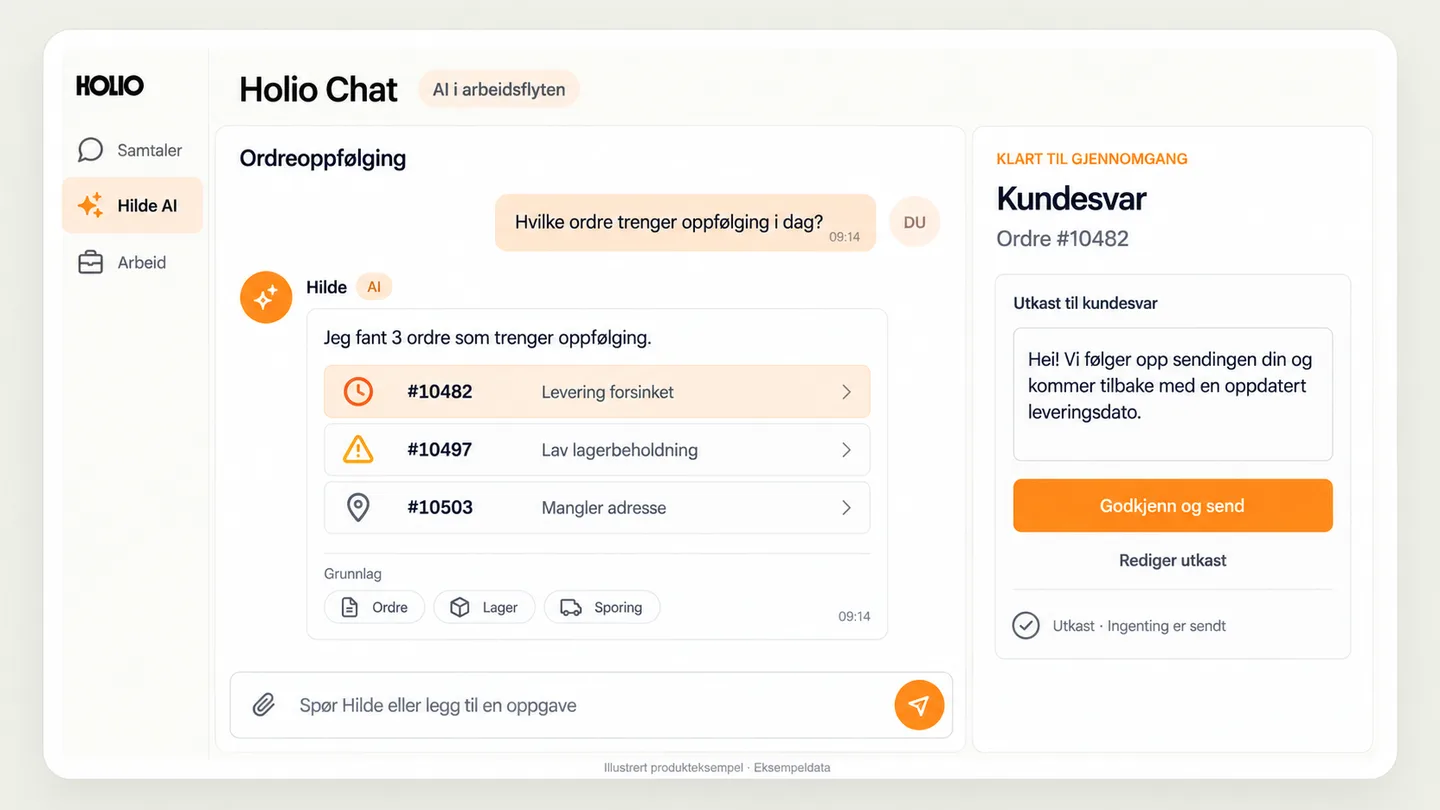
Holio Chat. From a question to the next step.
Ask about orders, customers or inventory. Let AI help identify what needs attention, understand the supporting data and prepare the next step.
See what needs attention. In this example, Hilde finds three orders with different issues and shows the data behind its assessment.
Work with a concrete draft. A customer reply is ready beside the conversation. Read, edit and approve it before sending.
Bring the team into the work. Continue in channels, groups or direct messages, with files and decisions in the same workspace.
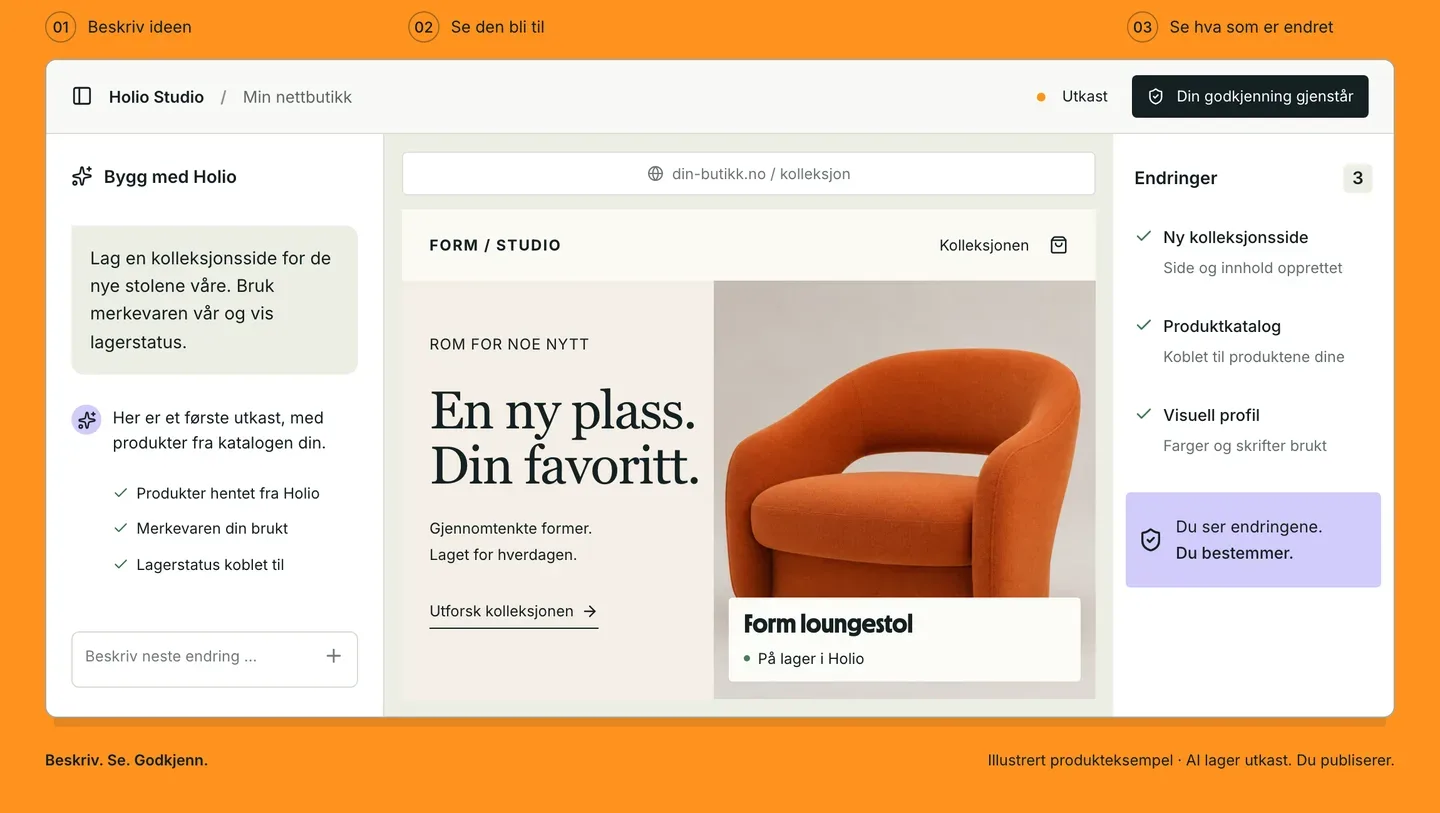
Holio Code / Studio. Turn an idea into a workspace.
A new website, a better customer page or a custom warehouse overview. Describe what you need and develop a draft built on the Holio platform.
Studio brings the page into view. Create websites, webshop pages and internal workspaces using products, customers and orders as a starting point. Preview the result and review the changes before publication.
Code gives developers a workbench. Work with project files, AI-assisted code and change review. Code is the developer tool; Studio is the environment for pages and content.
You describe the need, review the result and decide what to put into use.
From first conversation to running
Four steps. None of them asks you to stop something that works.
Mapping
We go through the systems you have, who does what, and which numbers are hard to get at today. One or two conversations.
Connecting
We connect the finance system, CRM, store and carriers, and mirror the history. Everything keeps running while we do.
Configuration
Screens, queues, roles and permissions are set up for how you actually work — not for how a default menu was drawn.
Operations
We watch the sync, the errors and the usage, and you have one contact who knows your setup.
What people ask first
Do we have to change ERP?
No. Workspace reads from the ERP you have. Visma Business NXT is the one we know best, and bookkeeping, VAT and ledgers go straight against it.
Where does the data live?
In the EU. The database and the AI models run in European regions, and there is a separate switch that must be turned on before anything is processed outside the EU.
What happens to HubSpot?
HubSpot stays as your CRM and your mail sender. Workspace mirrors contacts, companies, deals, quotes and invoices in, so support and order desk see them without switching tabs.
Can we run several companies in one workspace?
Yes. Data and permissions are separated per company, and a user can have access to one or several. That is how groups and accounting firms use it.
Can we start with one part only?
Yes. Many start with customer service or shipping and grow from there. Modules are enabled per company, and what you have not enabled is not in the menu.
What does it cost?
It depends on which modules you use and how much goes through them. We set the price after a walkthrough so it is something you can budget — see Pricing.
See it on your own numbers
We connect a test environment and show the workspace with your orders, products and carrier rates — not with demo data.